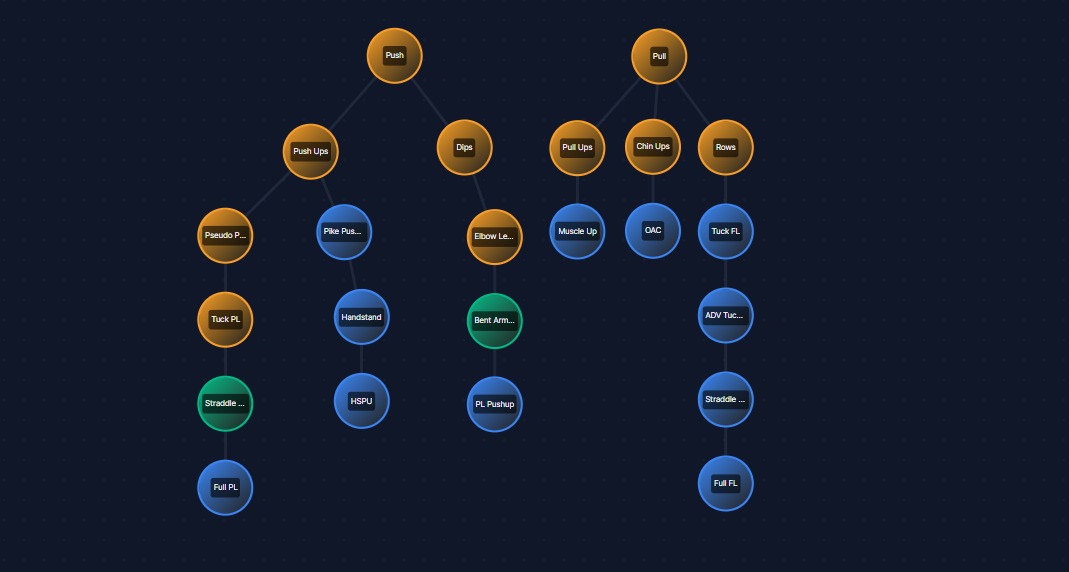
Our customizable calisthenics skill tree is a work in progress but will forever be free to use. Feel free to send us any feedback on bugs, or ways you think we can improve our skill tree tool. Desktop and Mobile controls are slightly different and “How To Use” instructions can be found below the tool.
How To Use Our Calisthenics Skill Tree On Desktop
| Action | Control |
|---|---|
| Change Skill Status | Left-click on a node to cycle through states: Locked ➔ Unlocked ➔ Good Form ➔ Mastered |
| Edit Skill Node | Right-click on a node to open the menu: • Add Branch: Creates a new connected node. • Rename: Change the text on the node. • Delete: Remove the node. |
| Move Node | Click and Drag any node to rearrange it. |
| Move View | Click and Drag on the empty background to pan around. |
| Zoom | Use your Mouse Wheel to zoom in and out. |
| Reset | Click the “Reset” button in the bottom right to clear all progress and restore the default Push/Pull user. |
How To Use Our Calisthenics Skill Tree On Mobile / Tablet
| Action | Control |
|---|---|
| Change Skill Status | Tap on a node to cycle through states. |
| Edit Skill Node | Long Press (hold for 1 second) on a node to open the edit menu. |
| Move Node | Touch and Drag a node immediately to move it. |
| Move View | Touch and Drag on the empty background to pan around. |
| Zoom | Pinch with two fingers to zoom in and out. |
| Reset | Tap the “Reset” button in the bottom right. |
IMPORTANT NOTE ABOUT OUR SKILL TREE
Saving Progress: Your progress is automatically saved to your browser’s local storage. You can close the tab and come back later, and your tree will be exactly as you left it. We do not save any of your data; it stays on your device. Switching devices will not carry progress over.
FAQs About Our Calisthenics Skill Tree
Example Of a Built Out Skill Tree